

(2026) PASS AI-103 exam with Microsoft AI-103 Real Exam Questions
Real exam questions are provided for Azure AI Engineer Associate tests, which can make sure you 100% pass
NEW QUESTION # 39
A developer needs a managed identity to call a Microsoft Foundry project endpoint to run inference and use agents. Security policy requires the least-privilege role that grants data-plane access and nothing more. Which built-in role should you assign to the managed identity?
- A. Foundry Account Owner
- B. Cognitive Services Contributor
- C. Foundry User
- D. Azure AI Developer
Answer: C
Explanation:
Foundry User is the least-privilege built-in role for Microsoft Foundry projects and grants the data- plane actions needed to call a project endpoint, run inference, and use agents. Microsoft recommends assigning the project's managed identity the Foundry User role on the Foundry resource.
NEW QUESTION # 40
You have a Microsoft Foundry project that contains an agent.
The agent ingests scanned PDF vendor invoices that contain tables and embedded QR codes.
The agent must preserve the PDF layout in the extracted output to ensure that downstream processing can reference sections and tables.
You plan to call Azure Content Understanding in Foundry Tools.
You need to extract content and layout elements and detect QR codes without requiring a language model deployment.
Which built-in analyzer should you use?
- A. prebuilt-documentFieldSchema
- B. prebuilt-read
- C. prebuilt-layout
- D. prebuilt-documentSearch
Answer: C
Explanation:
To extract content, preserve tables and document layout, and detect embedded QR codes without deploying a large language model (LLM), you should use the built-in prebuilt-layout analyzer.
Note:
Unlike schema-driven extraction models in Content Understanding that utilize generative AI orchestration, the Layout analyzer is a highly efficient machine-learning-based model. It natively outputs structural geometry and decodes barcodes without requiring an active LLM deployment or provisioned throughput.
Structural Preservation: It extracts headers, paragraphs, and nested sections, returning precise spatial bounding boxes for every single element. Downstream agents can utilize this geometric metadata to anchor or cross-reference sections accurately.
Advanced Table Mapping: It maps intricate, multi-page invoice tables, capturing text alongside row and column indices. You can configure the output structure format natively into Markdown or HTML tables to maintain formatting cleanliness.
Built-in QR and Barcode Decoding: By default, the configuration parameter enableBarcode is set to true. The analyzer scans the scanned PDF image, isolates 2D code regions, and appends the decoded string payload into the output JSON alongside text blocks.
Zero LLM Dependency: It does not route text to foundational models like GPT-4o for its extraction, keeping processing latency low and lowering operational costs significantly.
Reference:
https://learn.microsoft.com/en-us/azure/ai-services/content-understanding/quickstart/content-understanding-studio
NEW QUESTION # 41
A customer support agent must answer from an internal knowledge base that is updated weekly with new product documentation, and its answers must always reflect the latest content. Which approach should you implement?
- A. Implement retrieval-augmented generation (RAG) over an index of the documents
- B. Raise the model temperature to improve recall of recent facts
- C. Fine-tune the base model on the new documents every week
- D. Apply Direct Preference Optimization (DPO) to the documents
Answer: A
Explanation:
RAG injects fresh, frequently changing knowledge at inference time by retrieving relevant content from an index and grounding the model's answer in it, which is exactly the "chat with your data" pattern this scenario describes. Microsoft's guidance is direct on the boundary between the two techniques.
Use fine-tuning when you need to change model behavior, style, or task performance, rather than add fresh knowledge.
NEW QUESTION # 42
You are planning a Microsoft Foundry project named Project1 that will contain multiple agents.
Each agent will access the same Azure AI Search resource.
You need to recommend a solution to centrally manage the Azure AI Search credentials within Project1. The solution must be implemented across all the agents.
What should you recommend?
- A. Create a managed private endpoint that connects to the Azure AI Search resource.
- B. Add a connection to the Azure AI Search resource.
- C. Enable role-based access control (RBAC) for the Azure AI Search resource.
- D. Disable key-based access control on the Azure AI Search resource.
Answer: B
Explanation:
To best manage security and centrally handle credentials across multiple agents, you should add a connection to the Azure AI Search resource at the Azure AI Foundry project level.
Why This Works
Central Hub: The project acts as the single security perimeter for all your agents.
Credential Masking: Agents inherit access without hardcoding secrets, API keys, or connection strings in their code.
Identity Management: It allows you to leverage Microsoft Entra ID (formerly Azure AD) for role- based access control (RBAC).
How to Implement It
1. Navigate to your Azure AI Foundry portal.
2. Select your specific project from the dashboard.
3. Open the "Management Center" or "Project settings" tab.
4. Click on "Connected resources" or "Connections".
5. Add the Azure AI Search resource.
6. Choose Entra ID (managed identity) over API keys for maximum security.
Reference:
https://partner.microsoft.com/en-us/blog/article/azure-updates-december-2025
NEW QUESTION # 43
Note: This section contains one or more sets of questions with the same scenario and problem. Each question presents a unique solution to the problem. You must determine whether the solution meets the stated goals. More than one solution in the set might solve the problem. It is also possible that none of the solutions in the set solve the problem.
After you answer a question in this section, you will NOT be able to return. As a result, these questions do not appear on the Review Screen.
You have a multimodal Al generative model that accepts image uploads and uses extracted image text to generate responses.
You discover that users can upload unsafe images and embed hidden instructions into images to manipulate the model.
You need to implement controls to mitigate the risk.
Solution: You configure a prompt shield for user prompts.
Does this meet the goal?
- A. No
- B. Yes
Answer: A
Explanation:
The solution does not meet the goal. Prompt Shields for user prompts are designed to detect direct attempts by a user to manipulate the model through the prompt itself. In this scenario, the malicious instructions are embedded inside uploaded images and then introduced into the model context through extracted image text.
That pattern is an indirect prompt injection or document attack, not merely a direct user-prompt attack.
Microsoft's Prompt Shields guidance distinguishes between user prompt attacks and document attacks, and states that document attacks involve harmful instructions embedded in supplied documents or third-party content.
The solution is also incomplete because users can upload unsafe images. Azure AI Content Safety includes image APIs that detect harmful content in images and support moderation across modalities. A complete mitigation would combine image moderation for unsafe visual content with Prompt Shields for document attacks, and optionally Spotlighting, so OCR-derived or embedded image text is treated as lower-trust context.
Prompt Shields for user prompts alone would not reliably block unsafe images or hidden instructions extracted from those images. Reference topics: Azure AI Content Safety, Prompt Shields, user prompt attacks, document attacks, image moderation, and multimodal safety.
NEW QUESTION # 44
Hotspot Question
You have a Microsoft Founcy project that contains a Retrieval Augmented Generation (RAG) solution.
You need to run a pre-production evaluation by using labeled CSV dataset that contains the query, context, response and ground truth. The evaluation must measure the following:
- Whether responses address the user query
- Whether responses are supported by the provided context
- Whether responses contain sensitive or proprietary information
Which AI quality evaluation metrics should you use? To answer, select the appropriate options in the answer area.
NOTE: Each correct selection is worth one point.
Answer:
Explanation:
Explanation:
Box 1: Groundedness and Relevance
The two best AI quality evaluation metrics for your pre-production evaluation in Microsoft Foundry are Relevance and Groundedness.
Microsoft Foundry provides built-in, AI-assisted quality evaluators specifically designed to measure these two critical dimensions of a Retrieval-Augmented Generation (RAG) system:
Relevance: This metric directly addresses your first requirement: whether responses address the user query. It evaluates how well the gens.nerated response aligns with and answers the initial user query.
Groundedness: This metric directly addresses your second requirement: whether responses are supported by the provided context. It evaluates the degree to which the generated response is factually supported by and derived strictly from the retrieved context, which helps capture model hallucinatio Box 2: Protected material The best AI quality evaluation metric for this scenario is Protected material.
Direct alignment: The Protected material metric specifically checks whether an AI model outputs copyrighted text, proprietary data, or sensitive information that matches its training data or internal context.
Reference:
https://learn.microsoft.com/en-us/azure/foundry/concepts/observability
https://learn.microsoft.com/en-us/azure/foundry/how-to/develop/langchain-middleware
NEW QUESTION # 45
You have an Azure subscription that contains an Azure OpenAI resource.
You deploy the GPT-4 model to the resource.
You need to ensure that you can upload files that will be used as grounding data for the model.
Which two types of resources should you create? Each correct answer presents part of the solution.
NOTE: Each correct selection is worth one point.
- A. Azure AI Bot Service
- B. Azure SQL
- C. Azure AI Search
- D. Azure AI Document Intelligence
- E. Azure Blob Storage
Answer: C,E
Explanation:
Azure OpenAI On Your Data enables you to run advanced AI models such as GPT-35-Turbo and GPT-4 on your own enterprise data without needing to train or fine-tune models.
For some data sources such as uploading files from your local machine (preview) or data contained in a blob storage account (preview), Azure AI Search is used.
Reference:
https://learn.microsoft.com/en-us/azure/ai-services/openai/concepts/use-your-data
NEW QUESTION # 46
Hotspot Question
You need to create a new resource that will be used to perform sentiment analysis and optical character recognition (OCR). The solution must meet the following requirements:
- Use a single key and endpoint to access multiple services.
- Consolidate billing for future services that you might use.
- Support the use of Azure Vision in Foundry Tools in the future.
How should you complete the HTTP request to create the new resource? To answer, select the appropriate options in the answer area.
NOTE: Each correct selection is worth one point.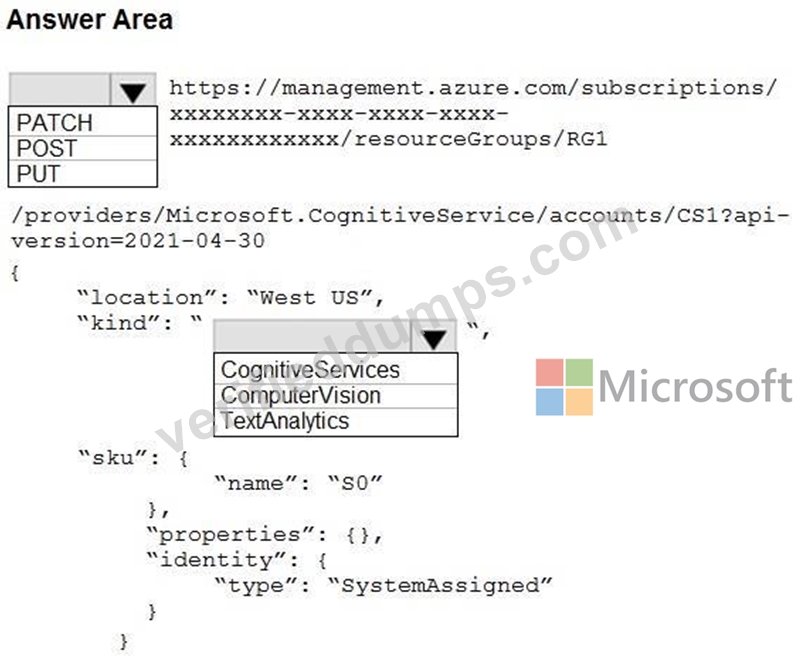
Answer:
Explanation:
Explanation:
Box 1: PUT
Need to create a Cognitive Services Multi-Service resource using the PUT method. This specific resource type provides a single endpoint and key for multiple AI services, consolidates billing, and supports Azure Vision.
Box 2: CognitiveServices
Using the CognitiveServices kind creates a multi-service resource. This fulfills all the requirements by providing a single key and endpoint for multiple services, consolidating billing, and enabling access to features like Azure AI Vision and Text Analytics under one roof.
Reference:
https://learn.microsoft.com/en-us/azure/foundry/how-to/develop/sdk-overview
NEW QUESTION # 47
You have a Microsoft Foundry project that contains an agent.
The agent uses Azure Content Understanding in Foundry Too to process vendor onboarding packets. The packs include digital PDFs that contain tables and hyperlinks.
The extracted content is indexed for search and provided to a downstream agent in the Markdown format.
You need to generate a Markdown output that has a layout and a semantic structure optimized for Retrieval Augmented Generation (RAG) workflows.
Which built-in analyzer should you use?
- A. prebuilt-documentFieldSchema
- B. prebuilt-read
- C. prebuilt-documentSearch
- D. prebuilt-layout
Answer: C
Explanation:
The appropriate built-in analyzer to use is prebuilt-documentSearch.
RAG Optimization: The prebuilt-documentSearch analyzer is part of the dedicated Retrieval- Augmented Generation (RAG) analyzer suite within Azure Content Understanding. It is specifically built to perform semantic analysis and extract documents in structures optimized for chunking, indexing, and vector workflows.
Native Markdown Layout: It extracts layout structures (such as paragraphs, complex multi-page tables, and hierarchical sections) directly into clean Markdown format. This structural preservation is ideal for downstream consumption by large language models (LLMs) or other AI agents.
Reference:
https://learn.microsoft.com/en-us/azure/ai-services/content-understanding/concepts/prebuilt-analyzers
NEW QUESTION # 48
You are developing a new sales system that will process user-generated video and text from a public-facing website.
You plan to notify users that their data has been processed by the sales system.
Which responsible AI principle does this help meet?
- A. inclusiveness
- B. transparency
- C. reliability and safety
- D. fairness
Answer: B
Explanation:
Notifying users that their data has been processed by your sales system fulfills the Transparency responsible AI principle. Transparency ensures that users are informed about how their data is collected and processed, which helps foster understanding and build trust between users and technology providers.
Reference:
https://learn.microsoft.com/en-us/microsoft-copilot-studio/guidance/responsible-ai
NEW QUESTION # 49
Case Study 1 - Contoso, Ltd
Overview
Company Information
Contoso, Ltd is a multinational retail company that builds, deploys, and manages generative AI and agent-based solutions by using Microsoft Foundry.
Existing Environment
Identity Environment
Contoso uses Microsoft Entra ID for identity management, authentication, and authorization capabilities that enable agents to access organizational resources and services.
Contoso recently formed a new AI engineering team named Agent1Dev Team to optimize and maintain existing AI solutions.
The team collaborates with solution architects, DevOps engineers, and security engineers to design, implement. monitor, and secure AI applications.
Contoso also has a team named Agent1Test Team that is responsible for validating AI solutions before the solution deployments.
Generative Environment
Contoso has a Microsoft Foundry deployment that contains two projects named Project1 and Project2.
Project1
Project1 contains a customer support agent named Agent1 that assists customers with product inquiries and troubleshooting requests.
Agent1 has the following configurations:
- Agent1 uses a base model deployment.
- A safety evaluation pipeline is NOT enabled.
- Tool invocation approval workflows are NOT enabled.
- Conversation memory constraints are NOT configured.
Agent1 interacts with customers by using digital support channels and answers general questions about Contoso products.
Project1 is deployed to an Azure region located in the European Union (EU).
Agent1Dev Team will use Project1 to optimize and maintain Agent1.
Project2
Project2 contains a deployed video generation model. The marketing department at Contoso has access to Project2 and plans to use the model to develop a video creation solution.
Development of the solution is incomplete.
Data Environment
Contoso stores product-related information in Azure resources that support AI applications.
The Azure environment contains an Azure Blob Storage account named storage1 that stores product detail sheets for all the Contoso products.
The product sheets include specifications, feature descriptions, and product support information that Agent1 can use to answer customer questions. The product sheets are stored in the PDF format.
Problem Statements
Contoso identifies the following issues:
- Agent1 has only general knowledge of the Contoso products.
- A recent chat interaction with Agent1 was analyzed for sentiment. The results of the analysis have NOT been processed yet.
- Agent1 does NOT use the detailed product information in the product sheets stored in storage1 when responding to customer questions.
- The finance department at Contoso reports that vendor invoices must be reviewed manually to ensure that the invoices match the terms defined in the vendor contracts. The invoices contain tables, logos, and varied layouts that make the documents difficult to process consistently.
Requirements
Planned Changes
Contoso plans to implement the following changes:
- Implement a solution for Project1 that analyzes the vendor invoices by evaluating both the visual layout and the textual content of the invoices, so that the invoice details can be verified against the vendor contract terms.
- Update the base model deployment used by Agent1 and standardize the model version to ensure continuity and consistent responses.
- Enable Agent1 to retrieve and use the detailed product information from the product sheets stored in storage1.
- Implement an indexing solution for the product sheets that Agent1 can use to answer customer questions.
- Complete the development of the video creation solution.
Technical Requirements
Contoso identifies the following technical requirements:
- The model deployment used by Agent1 must support scalable, high-throughput generative AI workloads and dynamically scale to handle variable customer support traffic, without requiring reserved throughput capacity.
- The product sheets must be processed by using an indexing pipeline that enables semantic and vector search, so that Agent1 can retrieve the relevant product information.
- Responses generated by using the product sheet information must be relevant, complete, and accurate.
- Agent1 must be able to use the product sheets to answer natural language questions about product details.
- The model version used by Agent1 must remain consistent to ensure stable responses.
- The data processed by the model must remain within the EU.
Security and Compliance Requirements
Contoso identifies the following security and compliance requirements:
- API keys must NOT be used to access Foundry-deployed models.
- Access to the Azure resources must follow the principle of least privilege.
- The developers at Contoso must authenticate to Microsoft Foundry resources by using Microsoft Entra authentication.
- Access to Project1 must be assigned to the members of Agent1Dev Team by using a security group named SC_Agent1_Dev.
- Access to Project1 must be assigned to the members of Agent1Test Team by using a security group named SC_Agent1_Test.
- Agent1 must never reveal customer information, even if a document that contains customer data is added erroneously to the product sheet repository in storage1.
- The product sheets might contain images that include embedded text. Agent1 must be protected from malicious instructions potentially hidden within the images.
Business Requirements
Contoso identifies the following business requirements:
- Users that interact with Agent1 must have a personalized experience in future interactions, including the ability for Agent1 to retain conversation context and recall relevant information from previous interactions.
- Agent1 must answer questions only about the products sold by Contoso.
You need to configure an indexing pipeline for Agent1 to retrieve the relevant product information in storage1. The solution must meet the technical requirement.
Which two built-in skills should you use? Each correct answer presents part of the solution.
NOTE: Each correct selection is worth one point.
- A. Language Detection
- B. Entity Recognition
- C. key phrase extraction
- D. Azure OpenAI Embedding
- E. Text Split
- F. Merge
Answer: D,E
Explanation:
The most essential skills for this scenario are Azure OpenAI Embedding and Text Split.
Azure OpenAI Embedding: This skill is critical for generating the vector representations (embeddings) of your text, which directly enables the required vector search capability.
Text Split: This skill is essential because LLMs and embedding models have strict token limits.
Breaking large product detail sheets into smaller chunks ensures the text fits into the embedding model and improves the accuracy of semantic search.
Incorrect:
[Not B]
Entity Recognition: This extracts specific entities like names, dates, or locations. While helpful for advanced filtering, it is not a foundational requirement to enable basic semantic or vector search.
[Not D]
Merge: This skill combines text from multiple fields into a single string. Since product sheets are already unified documents, splitting and chunking them is the priority rather than merging separate fields.
[Not E]
Language Detection: This identifies the language of the input text. Unless your product sheets are completely multilingual and require conditional routing to different language models, this skill is secondary.
[Not F]
Key Phrase Extraction: This pulls out main talking points or keywords. This is primary used for traditional keyword tagging or basic search indexing, whereas your requirement specifically dictates vector and semantic-based retrieval.
Scenario:
Technical Requirements;
*-> The product sheets must be processed by using an indexing pipeline that enables semantic and vector search, so that Agent1 can retrieve the relevant product information.
Data environment: The Azure environment contains an Azure Blob Storage account named storage1 that stores product detail sheets for all the Contoso products.
Planned changes: Enable Agent1 to retrieve and use the detailed product information from the product sheets stored in storage1.
Reference:
https://www.rheininsights.com/blog/en/Retrieval+Augmented+Generation+with+Azure+AI+Search
+and+Atlassian+Confluence.php
NEW QUESTION # 50
You have a Microsoft Foundry project that contains an agent.
The agent uses a knowledge source built from documents stored in Azure Blob Storage. The documents include digitally scanned PDFs that contain multipage tables.
You have an ingestion job that extracts only plain text, causing loss of table structure, headings, and page-number metadata.
Users frequently ask questions that require the retrieval of specific table rows across the pages.
You need to configure an ingestion job for a Retrieval Augmented Generation (RAG) pipeline that performs optical character recognition (OCR) on scanned PDFs, preserves tables and headings as structure-aware chunks, and stores page-number metadata with each chunk.
How should you configure the ingestion job?
- A. Use basic parsing and fixed-size chunking.
- B. Use page-level OCR extraction and store each page as a single chunk.
- C. Use advanced data parsing to reingest the documents.
- D. Use OCR and page-level chunking.
Answer: D
Explanation:
Use OCR and page-level chunking.
Structure Preservation: OCR combined with document layout analysis (such as layout-aware or page-level chunking) detects visual structures like tables, headers, and reading order.
Row-Level Granularity: Page-level chunking retains the boundaries and context of multipage tables, enabling the RAG system to isolate and retrieve specific rows effectively.
Metadata Enrichment: Processing documents page-by-page allows the ingestion pipeline to automatically tag each extracted text chunk with its source page-number metadata.
Incorrect:
[not C]
Use page-level OCR extraction and store each page as a single chunk:
While this captures page numbers, storing an entire page as a single chunk introduces too much noise. It prevents the model from pinpointing specific table rows and often exceeds the optimal context window size for precise RAG retrieval.
[Not D]
Use basic parsing and fixed-size chunking:
Basic parsing cannot read digitally scanned PDFs, resulting in empty or completely garbled text.
Furthermore, fixed-size chunking splits text at arbitrary character limits, which destroys table structures and splits individual rows across different chunks.
Reference:
https://pub.towardsai.net/unlocking-key-technologies-in-document-parsing-81bfe20d741b
NEW QUESTION # 51
You have a Microsoft Foundry project that contains an agent. The agent uses Azure Al Search as the retriever.
You plan to ingest PDFs into an Azure Al Search index to ensure that the agent can ground responses in texts in both documents and embedded images.
Users require citations that link to the source files.
You need to ensure that during indexing, the images are extracted into a structure that can be used as input for the built-in optical character recognition (OCR) skill.
Which indexing approach should you use?
- A. a skillset to run the OCR skill directly against the content field of the index
- B. a Shaper skill to restructure the OCR input
- C. an indexer to extract image data into a normalized_images collection
- D. the outputFieldMappings parameter to write image data to a searchable field
Answer: C
Explanation:
The correct indexing approach is to use an indexer to extract image data into a normalized_images collection . In Azure AI Search enrichment pipelines, embedded images in PDFs are not passed directly from the text content field into OCR. Instead, the indexer must perform document cracking and image extraction by enabling the indexer image action. Microsoft's Azure AI Search documentation states that image-processing skills such as OCR and image analysis expect normalized images, and that enabling imageAction causes embedded images to be extracted and normalized for downstream skills.
The OCR skill is designed to receive image input from /document/normalized_images/*. Microsoft's skillset tutorial specifically states that the OCR skill assumes a normalized_images field exists and that this field is generated by setting the indexer imageAction configuration to generateNormalizedImages. The document extraction skill reference also confirms that generateNormalizedImages creates an array of normalized images during document cracking for OCR and image analysis.
Option A is incorrect because OCR does not run directly against the index content field. Option B maps outputs after enrichment; it does not extract images. Option D reshapes data but does not create the required normalized image collection. Reference topics: Azure AI Search indexers, AI enrichment, OCR skill, imageAction, and normalized_images.
NEW QUESTION # 52
You have a Microsoft Foundry project that contains an agent. The agent has a Model Context Protocol (MCP) tool that queries a knowledge base stored in Azure AI Search.
Some agent runs return answers from the base model without invoking the knowledge base, which results in responses without grounded citations.
You are provided with the following code snippet that runs the agent.
run = project_client.agents.runs.create_and_process(
thread_id=thread.id,
agent_id=agent.id,
)
You need to add the correct tool_choice parameter to the code to deterministically force the agent to invoke the MCP tool on each run.
What should you add?
- A. tool_choice ={ " type " : " mcp " }
- B. tool_choice={ " required " }
- C. tool_choice={ " type " : " knowledge_base " }
- D. tool_choice={ " auto " }
Answer: B
Explanation:
The correct selection is D . In Microsoft Foundry Agent Service, tool_choice is the runtime control used to influence whether the model may answer directly or must invoke a tool. Microsoft's tool best-practice guidance states that auto lets the model decide whether to call tools, none prevents tool calls, and required means the model must call one or more tools. This directly addresses the issue where some runs answer from the base model and skip the knowledge base.
For an agentic retrieval solution backed by Azure AI Search through an MCP tool, Microsoft's tutorial states that setting tool_choice= " required " ensures the agent always uses the knowledge base tool when processing queries. This produces grounded answers because the run is forced into tool invocation before responding.
auto is incorrect because it preserves the nondeterministic behavior already causing missing citations. { " type
" : " knowledge_base " } is not a valid Foundry tool-choice type. { " type " : " mcp " } describes an MCP tool type in some Responses API schemas, but the deterministic guarantee for this agent run scenario is the required tool-call mode. Reference topics: Microsoft Foundry Agent Service, MCP tools, Azure AI Search agentic retrieval, tool_choice, and grounded citations.
NEW QUESTION # 53
You have a Microsoft Foundry project that ingests scanned PDF invoices stored in Azure Blob Storage. Each invoice contains printed line items and has a table-based layout.
Extracted results are stored as structured JSON and used as grounding data for an agent in a Retrieval Augmented Generation (RAG) solution.
You need to create a single analyzer that meets the following requirements:
* Extracts the invoice number, invoice date, vendor name, and total amount across varying templates
* Returns confidence scores so that results with confidence below 0.80 can be routed for supervisor review What should you use?
- A. a custom Azure Content Understanding in Foundry Tools analyzer that defines the required fields as the extracted fields and the returned confidence scores for routing
- B. the Azure Content Understanding in Foundry Tools prebuilt-documentSearch analyzer and search.score from the Azure AI Search results for routing
- C. a Foundry agent that has groundedness guardrails enabled to extract invoice fields and confidence scores
- D. the Azure Content Understanding in Foundry Tools prebuilt-layout analyzer
Answer: A
Explanation:
The correct answer is C because the requirement is structured field extraction from invoices across varying templates, not only OCR or layout preservation. Azure Content Understanding analyzers are reusable configurations that combine content extraction, AI-powered analysis, and structured data output, and Microsoft states that custom analyzers can be created for specific extraction needs. In this case, the analyzer schema should define fields such as invoice number, invoice date, vendor name, and total amount so the output can be returned as structured JSON for downstream RAG grounding.
The confidence-routing requirement also points to Content Understanding field confidence scores. Microsoft documentation states that every field can include a confidence score from 0 to 1, and that confidence scores can be used to automate high-confidence results while routing low-confidence results for human review. A threshold such as 0.80 is therefore an application routing rule based on the returned field confidence. The prebuilt-layout analyzer preserves layout but does not define invoice-specific business fields. Groundedness guardrails evaluate generated answers, not invoice field extraction. Azure AI Search search.score measures retrieval relevance, not extraction confidence. Reference topics: Content Understanding custom analyzers, document field extraction, structured JSON output, confidence scoring, and RAG grounding.
NEW QUESTION # 54
You are building a text-to-speech solution that uses Azure Speech in Foundry Tools to read instructions from the script in a text file.
You discover that the solution often pronounces technical terms incorrectly.
You need to prevent the incorrect pronunciations. The solution must minimize development effort.
What should you do?
- A. From Speech Studio, train a custom neural voice
- B. Use Speech Synthesis Markup Language (SSML) to adjust the prosody of the voice.
- C. Use Speech Synthesis Markup Language (SSML) to specify phonemes.
- D. Use Speech Synthesis Markup Language (SSML) to apply say as rules.
- E. From Azure OpenAI use the Whisper model.
Answer: C
Explanation:
Using Speech Synthesis Markup Language (SSML) with the <phoneme> element is the ideal way to fix mispronunciations for technical terms.
The <phoneme> tag lets you override the default text-to-speech model by explicitly defining the sounds using the International Phonetic Alphabet (IPA).
Reference:
https://learn.microsoft.com/en-us/answers/questions/5729867/pronunciation-issue-when-generating-audio-from-ssm
NEW QUESTION # 55
You have a large collection of image files and PDF documents stored in an Azure Storage account. The documents contain tabular data.
You need to extract the tables into a structured format that can be imported into a database. The solution must minimize development effort. What should you use?
- A. Azure Vision in Foundry Tools
- B. Azure Content Understanding in Foundry Tools
- C. Azure Document Intelligence in Foundry Tools
- D. Azure AI Video Indexer
Answer: C
Explanation:
To extract tables from numerous images and PDF documents in Azure Storage into a structured database with low development, you should utilize Azure AI Document Intelligence (formerly Form Recognizer) within the Azure AI Foundry ecosystem. The Layout Model is best for extracting tables, rows, columns, and headers.
Reference:
https://azure.microsoft.com/en-us/products/ai-foundry/tools/document-intelligence
NEW QUESTION # 56
Hotspot Question
Your company is piloting a customer support agent in a Microsoft Foundry project name Project1.
Project1 is connected to an existing Application Insights resource, and the company's support team reviews runs in the Traces tab.
The Foundry Agent Service is configured to perform the following actions:
- Retrieve the Application Insights connection string by calling
project_client.telemetry.get_application_insights_connection_string().
- Call configure_azure_monitor(connection_string=...) to enable
telemetry.
A separate LangChain service is configured to use OpenTelemetry and has the following configurations:
- Uses AzureAIOpenTelemetryTracer(connection_string=...,
enable_content_recording=False)
- Passes the tracer by using config={"callbacks":[azure_tracer]}
Company policy has the following requirements:
- Telemetry from LangChain and OpenTelemetry must be distinguishable
within the same Application Insights resource.
- Secrets and credentials must NOT be stored in prompts, tool
arguments, or span attributes.
For each of the following statements, select Yes if the statement is true. Otherwise, select No.
NOTE: Each correct selection is worth one point.
Answer:
Explanation:
NEW QUESTION # 57
Note: This section contains one or more sets of questions with the same scenario and problem. Each question presents a unique solution to the problem. You must determine whether the solution meets the stated goals. More than one solution in the set might solve the problem. It is also possible that none of the solutions in the set solve the problem.
After you answer a question in this section, you will NOT be able to return. As a result, these questions do not appear on the Review Screen.
You have a Microsoft Foundry project that contains an agent. The agent generates summaries from retrieved policy documents.
Users report that some responses omit required regulatory clauses, even when the clauses are present in the retrieved content.
You need to improve response completeness.
Solution: You add a reflection pass that regenerates the response if the required clauses are missing.
Does this meet the goal?
- A. No
- B. Yes
Answer: B
Explanation:
Correct:
* You add a reflection pass that regenerates the response if the required clauses are missing.
This is Self-Correction Strategy: A reflection pass allows an agent to evaluate its own initial output against specified constraints (e.g., checking for the presence of mandatory regulatory clauses). If the required text is missing, the agent triggers a programmatic self-correction or regeneration loop to include them before final delivery.
Incorrect:
* You increase the value of the max_tokens parameter.
Increasing the max_tokens parameter prevents the response from being cut off mid-sentence due to length constraints. However, it does not force the model's logic to explicitly include missing information that it chose to leave out earlier in the text.
* You increase the value of the temperature parameter.
Raising the temperature parameter increases randomness and creativity. For rigid compliance tasks like summarizing regulatory documents, higher temperature actually increases the risk of hallucination and omission.
* You run an evaluation flow that scores responses for completeness and blocks responses that fall below a defined threshold.
Evaluation Flow Block: Running an evaluation flow to score completeness and blocking bad responses identifies and stops low-quality outputs, but it does not fix or actively improve the response completeness. It simply filters failures out of the system.
Reference:
https://pub.towardsai.net/reflection-with-llm-how-to-make-ai-review-its-own-work-2db122fca1d8
NEW QUESTION # 58
Note: This section contains one or more sets of questions with the same scenario and problem. Each question presents a unique solution to the problem. You must determine whether the solution meets the stated goals. More than one solution in the set might solve the problem. It is also possible that none of the solutions in the set solve the problem.
After you answer a question in this section, you will NOT be able to return. As a result, these questions do not appear on the Review Screen.
You have a multimodal AI generative model that accepts image uploads and uses extracted image text to generate responses.
You discover that users can upload unsafe images and embed hidden instructions into images to manipulate the model.
You need to implement controls to mitigate the risk.
Solution: You configure image moderation to block unsafe content before processing the images.
Does this meet the goal?
- A. No
- B. Yes
Answer: A
Explanation:
The solution does not fully meet the goal. Image moderation is appropriate for one part of the risk: blocking unsafe image content before the image is processed. Azure AI Content Safety provides image APIs that detect harmful content, and its harm categories and severity levels can be used to classify and block objectionable image content. This addresses unsafe photos, but it does not address hidden instructions embedded in images.
The second risk is prompt manipulation through extracted image text. After OCR extracts text from the uploaded image, that text becomes untrusted third-party content supplied to a generative model. Microsoft defines document attacks as malicious instructions embedded in third-party content, where the objective is to cause the model to execute unintended commands or alter intended behavior. Prompt Shields are the control designed to detect user prompt attacks and document attacks, including indirect attacks that come from uploaded or referenced content.
Therefore, image moderation alone is incomplete. A complete mitigation would combine image moderation for harmful visual content with Prompt Shields for document attacks, and optionally Spotlighting, so extracted or embedded text is treated as lower trust. Reference topics: Azure AI Content Safety, image moderation, Prompt Shields, document attacks, indirect prompt injection, and multimodal safety.
NEW QUESTION # 59
A copilot must answer multi-part questions that depend on earlier turns in the conversation. You want the system to break each complex question into focused subqueries, run them in parallel, and semantically rerank the results before composing an answer. Which Azure AI Search capability provides this?
- A. Classic keyword search with a scoring profile
- B. A single vector query with a high similarity threshold
- C. Agentic retrieval
- D. Increasing the top-k value on a single keyword query
Answer: C
Explanation:
Agentic retrieval in Azure AI Search uses a large language model to decompose a complex query into focused subqueries, runs them in parallel, semantically reranks each set of results, and merges them into a unified response, while taking conversation history into account. That is precisely the behaviour the scenario describes.
NEW QUESTION # 60
You are building an Azure AI Search indexing pipeline named Pipeline1 that ingests invoices stored in Azure Blob Storage. The invoices are stored as scanned images.
You need to enable users to search invoice data across the invoice fields.
Which built-in skill should you add to the skillset of Pipeline1?
- A. Text Split
- B. optical character recognition (OCR)
- C. Image Analysis
- D. Text Translation
Answer: B
Explanation:
You should add the Azure Machine Learning OCR skill (historically known as the Microsoft.Skills.Vision.OcrSkill) to your skillset pipeline.
Text Extraction: Scanned images contain unsearchable pixels rather than text.
Data Ingestion: The OCR skill extracts the printed text and layout information from the images.
Downstream Processing: It feeds raw text into subsequent skills (like Entity Recognition) or directly into your search index fields.
Reference:
https://techcommunity.microsoft.com/blog/azurearchitectureblog/from-large-semi-structured-docs-to-actionable-data-reusable-pipelines-with-adi-a/4474054
NEW QUESTION # 61
In mid-2026 you are starting a brand-new agentic application on Azure and want to build on the generally available, supported entry point for Foundry agents. Which API should you target?
- A. The LUIS runtime API
- B. The Assistants API
- C. The legacy text Completions API
- D. The Responses API via Foundry Agent Service
Answer: D
Explanation:
The Responses API is the generally available single entry point for Foundry Agent Service and supports both prompt agents and hosted agents. It is the API Microsoft directs new agentic development towards.
NEW QUESTION # 62
You are developing an app that will perform a sentiment analysis of social media posts by using the Azure AI Language service.
You perform a test on a sample post.
You need to quantify the results of the test.
Which JSON property should you review?
- A. confidenceThreshold
- B. sentiment
- C. confidenceScores
- D. relations
Answer: C
Explanation:
Sentiment analysis
The sentiment analysis feature assigns sentiment labels, such as "negative," "neutral," and
"positive." The service determines these labels using the highest confidence score. Sentiment is evaluated at both the sentence level and the document level. This feature also returns confidence scores between 0 and 1 for each document & sentences within it for positive, neutral, and negative sentiment.
In Azure AI Language's sentiment analysis, confidenceScores are numerical values between 0 and 1 that represent the probability that the text belongs to a specific sentiment (positive, neutral, or negative). A score closer to 1 indicates a higher confidence from the service that the text exhibits that sentiment, while a lower score signifies less confidence in that particular label. The service calculates these scores for both individual sentences and the entire document, providing a granular understanding of sentiment.
How to interpret confidenceScores:
High Score (close to 1): The model is very sure about the assigned sentiment. For example, a positive score of 0.95 means the model is 95% confident the text is positive.
Low Score (close to 0): The model is not very sure about the assigned sentiment.
Scores for each sentiment: For any given piece of text, the service returns a score for positive, neutral, and negative sentiment. The sentiment label that receives the highest score is assigned as the overall sentiment for that text.
Reference:
https://learn.microsoft.com/en-us/azure/ai-services/language-service/sentiment-opinion-mining/overview
NEW QUESTION # 63
Hotspot Question
You are building a model to detect objects in images.
The performance of the model based on training data is shown in the following exhibit.
Use the drop-down menus to select the answer choice that completes each statement based on the information presented in the graphic.
NOTE: Each correct selection is worth one point.
Answer:
Explanation:
Explanation:
Box 1: 0
The percentage of false positives is 0%.
Because the model made zero incorrect positive predictions, the count and percentage of false positives must be exactly zero.
Box 2: 25
The value for the number of true positives divided by the total number of true positives and false negatives is 25% (or 0.25).
High Precision (100%): Every single object your model detects is correct; it generates zero false alarms.
Low Recall (25%): Your model misses 75% of the actual objects it was supposed to find.
'
Reference:
https://medium.com/grabngoinfo/how-to-evaluate-the-performance-of-a-binary-classification-model-6e7193dcbbf9
NEW QUESTION # 64
......
Latest AI-103 Pass Guaranteed Exam Dumps Certification Sample Questions: https://pass4sure.verifieddumps.com/AI-103-valid-exam-braindumps.html
